Blogs

Why Schools Struggle With Parent Communication

Why Schools Struggle With Parent Communication

Communicating with parents is not easy for teachers. Teachers in the school have a lack of time availability. They have lots of work, like managing the class, giving proper grades to the students, handling administrative duties, etc. Communication between the school and parents is very important. Teachers are not able to respond quickly to the parents and the child’s performance. That’s why they need the help of AI tools.

Why Schools Struggle With Parent Communication Read More »

Why schools are slow to adopt technology

Why schools are slow to adopt technology

In today’s fast-paced digital world, technology is transforming industries at an unprecedented rate. From healthcare to finance, almost every sector has embraced digital innovation. However, when it comes to education, many institutions are still slow to adopt modern tools and digital solutions. This raises an important question: Why are schools slow to adopt technology? Here is Why schools are slow to adopt technology: While schools recognize the importance of digital learning, several challenges prevent them from fully integrating technology into classrooms. Let’s explore the key reasons behind this slow adoption and what can be done to overcome these barriers. 1. Budget Constraints and Funding Issues One of the biggest reasons schools are slow to adopt technology is limited funding. Implementing digital tools requires significant investment in hardware, software, training, and maintenance. Schools often operate on tight budgets. Purchasing smart boards, tablets, laptops, learning management systems (LMS), and upgrading internet infrastructure can be expensive. Additionally, technology requires ongoing maintenance and regular upgrades, which further increase costs. For many institutions, especially public schools and rural schools, allocating funds for technology becomes challenging when they must prioritize basic infrastructure and staff salaries. 2. Lack of Proper Infrastructure Technology adoption isn’t just about buying devices. Schools need strong infrastructure to support digital tools. Many schools face issues such as: Poor internet connectivity Outdated computer systems Insufficient power backup Limited IT support staff Without reliable infrastructure, technology becomes ineffective. A slow internet connection or system crashes during classes can discourage both teachers and students from relying on digital tools. 3. Resistance to Change Another major reason why schools are slow to adopt technology is resistance to change. Education systems have followed traditional teaching methods for decades, and shifting to digital platforms can feel overwhelming. Some teachers may feel uncomfortable using new tools, especially if they are not tech-savvy. There can be concerns about: Increased workload Learning new systems Losing control of the classroom Change requires time, patience, and proper training. Without strong leadership and clear guidance, schools may delay digital transformation. 4. Lack of Teacher Training Technology is only effective when teachers know how to use it properly. Unfortunately, many schools introduce digital tools without providing adequate training. Teachers need to understand: How to operate new software How to integrate technology into lesson plans How to manage digital classrooms How to ensure student engagement online Without proper training, technology can become a burden instead of a benefit. Schools that fail to invest in professional development often struggle with adoption. 5. Data Privacy and Security Concerns With increased use of digital platforms comes the risk of data breaches and cyber threats. Schools handle sensitive information such as student records, attendance data, exam results, and personal details. Administrators may hesitate to adopt technology due to concerns about: Data privacy laws Cybersecurity risks Online bullying Unauthorized access Ensuring secure systems requires additional investment in cybersecurity measures, which can slow down the adoption process. 6. Fear of Distraction Many educators worry that technology might distract students rather than enhance learning. Devices like tablets and laptops can sometimes lead to misuse, such as gaming or browsing social media during class. Schools often struggle to maintain discipline in digital environments. Without proper monitoring systems and clear policies, administrators may feel hesitant to introduce more technology into classrooms. 7. Inequality in Access Digital transformation can widen the gap between students from different socio-economic backgrounds. Not all students have access to devices or high-speed internet at home. Schools may hesitate to implement fully digital systems if they believe it could disadvantage some students. Ensuring equal access requires careful planning, additional funding, and sometimes government support. The Way Forward: How Schools Can Accelerate Technology Adoption Although schools face challenges, digital transformation in education is no longer optional—it is essential. Here are some practical steps to speed up adoption: 1. Start Small and Scale Gradually Schools can begin with basic tools like digital attendance systems or learning management platforms before moving to advanced solutions. 2. Invest in Teacher Training Regular workshops and training sessions can build teacher confidence and ensure effective implementation. 3. Focus on Long-Term ROI Instead of viewing technology as an expense, schools should see it as a long-term investment that improves efficiency, reduces paperwork, and enhances learning outcomes. 4. Strengthen Cybersecurity Implementing secure systems and educating staff about data protection can reduce privacy concerns. 5. Partner with Reliable EdTech Providers Collaborating with experienced technology providers ensures smoother implementation and ongoing support. Conclusion Schools are slow to adopt technology due to financial constraints, infrastructure challenges, resistance to change, and security concerns. However, the benefits of digital transformation far outweigh these obstacles. By implementing reliable, secure, and easy-to-use platforms like Rejoice Learning, schools can modernize their operations, improve communication, and enhance student outcomes. The future of education is digital—and the time to embrace it is now. FAQs regarding Why schools are slow to adopt technology 1. How does technology improve school management? Technology streamlines administrative tasks, improves communication between teachers and parents, tracks student performance, automates attendance, and reduces paperwork. This increases efficiency and allows educators to focus more on teaching. 2. What are the biggest challenges schools face in digital transformation? The biggest challenges include limited funding, outdated systems, poor internet connectivity, lack of technical expertise, and concerns about data privacy. Without proper guidance, schools may struggle to implement new technology effectively. 3. How can schools overcome resistance to technology adoption? Schools can overcome resistance by providing proper training, offering continuous support, and choosing user-friendly systems. When teachers and administrators understand the benefits and feel confident using the tools, adoption becomes smoother. 4. Is technology adoption expensive for schools? While there may be an initial investment, modern school management systems reduce long-term operational costs by automating attendance, fee management, reporting, and communication. Solutions like Rejoice Learning help schools save time and money in the long run.

Why schools are slow to adopt technology Read More »

The hidden costs of outdated school management systems

The hidden costs of outdated school management systems

Schools these days need to be on top of their game with tech – think smooth communication and easy learning. But lots of schools are stuck using old-school management systems that just don’t cut it anymore. These old systems might seem cheap, but they can actually cost you a lot in the long run by wasting resources and slowing things down. If you’re a school leader trying to get your school ready for the future, you need to know about the hidden costs of outdated school management systems. The hidden costs of outdated school management systems as follows: Below are the hidden costs of outdated school management systems: 1. Reduced Administrative Efficiency One big problem with old-school management systems is that they’re slow. Staff have to enter data by hand, fill out tons of paperwork, and deal with systems that don’t talk to each other. Things like tracking attendance, managing fees, making schedules, and writing reports take way too long and are full of mistakes. Because of this, admin staff spend way too much time on basic stuff instead of focusing on important things. All that wasted time adds up to higher costs and burnt-out staff. 2. Increased Risk of Data Errors and Loss It is common for legacy systems to have limitations in terms of real-time data synchronization, and they generally lack advanced validation processes, which makes it very easy to have incorrect student records, lost academic data, or student data duplication. When it comes to disputes with students and parents, improperly filed attendance, grades, or fee records will be the main issues. On the other hand, a very long time ago, the system did not have automated backup and cloud storage, which is why if a school experiences a hardware damage, cyber attack,k or natural disaster, then it would be their data loss, not a problem of the system failure anymore. The cost it needs to be invested for the data that was lost to be retrieved can be very highand sometimes you are not lucky enough to get the data back. 3. Poor Communication with Parents and Students Parents nowadays expect that they will be able to see and receive information through applications, emails, or a personal page. The school management system of the past had limited features in terms of integrated communication tools like notifications, messaging, or online portals. This breach in communication results in misunderstandings, parents not being aware of events or changes, delayed fee payments, and even parents’ dissatisfaction. The schools might end up using extra time and money to smooth out the complaints, which could have been prevented if they had a modern, connected system in the first place. 4. Hidden IT Maintenance and Upgrade Costs Initially, it may look like using an existing system is cheaper than getting a new one. But software that is no longer supported can require a lot of technical assistance, manual updates, and an expert IT team to be available at all times. Moreover, a legacy system may not work with the latest hardware or operating systems, so schools are forced to either get extra maintenance or put up with the inconveniences. These persistent IT expenses can rapidly become the equivalent of or more than the price of adopting a cutting-edge, cloud-based school management system. 5. Limited Scalability and Growth Challenges When schools increase their student base, their operational requirements also become complicated. An old-fashioned school management system typically ddoesn’thave the features to support scaling up. It can eventually become a problem or outright impossible to add more students, new classes, branches, or features. If the system is not scalable, the institution’s growth and innovation will be limited. The schools will be unable to launch new programs, digital learning tools, or use performance analytics, just because their system is not capable of supporting these initiatives. 6. Data Security Problems Schools deal with a lot of private info, like student records and health stuff. Old systems often don’t have good security, like encryption or regular updates. This can lead to data leaks, fines, and a bad reputation. Schools have to follow data protection rules, and if they don’t because their systems are old, they could get big fines and lose people’s trust. 7. Negative Impact on Teaching and Learning Old systems mess with more than just admin stuff—they hurt classrooms too. Teachers might struggle with clunky grading or not have good attendance systems. Without up-to-date info, teachers can’t easily see where students are struggling or how they’re doing. This can make teaching worse and students less interested, which hurts grades. 8. Missed Opportunities for Data-Driven Decisions Today’s school software gives you reports and analytics so leaders can make smart choices. Old-fashioned systems often give you simple, unchanging reports. If you don’t have good info about attendance, grades, or money, leaders might just take shots in the dark instead of using real data. This can cause bad planning, wasted money, and missed chances to get better. Conclusion Old school systems might look cheap to begin with, but they end up hurting your school’s performance and finances in the long run. From high repair costs and info mistakes to bad communication and not being able to grow, not doing anything costs you big time. Upgrading to a complete system like Rejoice Learning isn’t just about new tech – it’s a smart move that saves money, makes things easier, and helps your school do well in today’s digital world. FAQs regarding The hidden costs of outdated school management systems 1. How does Rejoice Learning make talking to parents better? Rejoice Learning has built-in notices, announcements, reminders, and parent websites. This keeps parents in the loop about attendance, fees, tests, and what’s happening at school as it happens. 2. How do old school systems make costs go up? Old systems make you spend more because of things like doing stuff by hand, making mistakes a lot, needing more IT help, using old hardware, and wasting staff time. These costs that you

The hidden costs of outdated school management systems Read More »

Why schools struggle with managing attendance manually

Why schools struggle with managing attendance manually

Keeping track of student attendance is super important for schools. It affects how students do in class, reports to the government, money for the school, talking to parents, and just making sure the school is doing its job. But lots of schools still use old-fashioned ways to mark attendance, like paper or spreadsheets. These old ways might seem easy, but they can cause big problems for schools. People make mistakes, it takes up too much time, and it’s hard to follow the rules. Managing attendance by hand can get really tough. Let’s check out why schools struggle with managing attendance manually when they do it by hand, what problems they run into, and how it messes with teachers, principals, students, and parents. Reasons: Why schools struggle with managing attendance manually 1. Takes Too Much Time One big reason why schools hate doing attendance by hand is that it takes so much time every day. Teachers spend a few minutes in each class calling out names and marking who’s there. That adds up over the whole day, and it takes away from teaching time. Then, office workers have to get all those records, look them over, and type the info into computers for reports. This whole thing slows everything down and makes the school less efficient. 2. Easy to Make Mistakes When you do attendance by hand, it all depends on people, and people mess up. Teachers might mark someone as present when they’re not, skip a name, or write the wrong date. If the handwriting is bad or the info is missing, it gets even harder to be accurate. Even small mistakes can cause trouble when attendance is used for tests, scholarships, or official reports. Fixing these mistakes takes even more time. 3. Hard to See Attendance Changes over time It’s really hard to see how attendance changes over time when you’re using paper records. Schools can’t easily spot kids who are always missing class or classes that always have low attendance. To look at attendance over weeks, months, or years, you have to go through a ton of registers and do the math yourself. Because of this, schools miss chances to help students who might be falling behind. 4. Records Can Get Lost or Damaged Paper attendance records can easily get ruined or lost. Registers can get misplaced, pages can rip, and ink can fade. Things like fire, water, or bugs can totally destroy the records. Once they’re gone, it’s usually impossible to get the attendance info back. This causes huge problems during audits, inspections, or when parents disagree with something. 5. Can’t See Attendance Right Away You can’t see attendance info right away when you do it by hand. You have to wait until the registers are collected and put together, which can take days or even weeks. Parents often don’t know their kid was absent until much later, which isn’t good. Principals also can’t see attendance trends quickly, so it’s hard to deal with problems like a sudden drop in attendance or emergencies. 6. More Work for Teachers Teachers already have a lot to do, like planning lessons, grading papers, and helping students. Doing attendance by hand just adds more work to their plate. Keeping up with registers, fixing mistakes, and answering questions about attendance takes time away from teaching. This can make teachers less motivated and hurt how well they teach. 7. Hard to Follow the Rules and Report Info Schools often have to keep accurate attendance records for money, programs, and the law. Doing attendance by hand makes it tough to make correct reports quickly. To get monthly or yearly attendance numbers, you have to look through a bunch of registers and double-check everything. Any mistakes can cause problems with the rules, get the school fined, or delay their funding. 8. Hard to Be Sure Everyone is Doing Their Job It’s hard to make sure everyone is being honest with manual attendance. People can mark someone as present when they’re not, or change the records without anyone knowing. Without computers tracking things, it’s tough to know who marked the attendance and when they changed it. This can make it hard for schools, parents, and the government to trust each other. In short: Schools Need a Better Way to Track Attendance Schools struggle with manual attendance because it’s old, slow, and not reliable. It wastes time, causes mistakes, isn’t transparent, and adds stress for teachers and principals. These days, it’s important to have correct info and see it right away. Rejoice Learning can help schools fix these problems by giving them a better way to manage attendance. By getting rid of manual attendance, schools can save time, be more accurate, talk to parents more easily, and create a more responsible learning place. FAQs regarding Why schools struggle with managing attendance manually Q. Why is manual attendance management not good for schools? Managing attendance by hand isn’t good because it takes up too much teaching time and makes more work for the office. Teachers have to mark attendance by hand, and office workers have to spend extra time getting, checking, and putting together the records. This whole thing makes the school less productive and slower. Q. What mistakes happen with manual attendance systems? Manual attendance systems can have mistakes like wrong marks, skipped names, wrong dates, and bad handwriting. These errors often don’t get noticed until they cause problems. Fixing these mistakes can take a lot of time and cause the school records to be wrong. Q. How does manual attendance affect how well kids do in school? Manual attendance makes it hard to see how attendance changes over time. Schools can’t easily find out if kids are missing a lot of class or if their attendance is getting worse. If they don’t know about this early, they can’t help the kids, which can make their grades worse. Q. Why is manual attendance risky when the school gets checked? Manual attendance records are on paper, which

Why schools struggle with managing attendance manually Read More »

Common mistakes schools make with record keeping

Common mistakes schools make with record keeping

Keeping good records is super important for any school to run well. Schools deal with tons of private info every day, from student stuff to money details. Good record-keeping means things are clear, the school follows the rules, and everything just works better day to day. But lots of schools, big and small, mess up their records in ways they could easily avoid. These slip-ups can cause a lot of trouble like mix-ups, rule-breaking, lost data, and even problems with the law. So, let’s look at some common mistakes schools make with record-keeping and how to Dodge them. Common Mistakes Schools Make With Record Keeping are as follows: Here are some common mistakes schools make with record keeping are as folllows: 1.  Using Too Much Paper One big mistake is still using way too much paper. Sure, paper files might seem safe, but they can get lost, wrecked, or just fall apart over time. Paper is also a pain to sort, search, and fix. And if there’s a fire, flood, or accident, bam, important stuff could be gone forever. What to do: Schools should switch to keeping records online, or at least have a backup online for the important stuff. 2. Files All Messed Up If files aren’t organized, it slows everyone down and causes mistakes. When nothing’s labeled right, and there’s no system, finding info takes forever and is super annoying. This happens a lot when schools don’t have a set way to file things or clear rules about it. What to do: Make a simple way to name and sort files, both on paper and online. Staying organized saves time and cuts down on mistakes. 3. Info Missing or Wrong Wrong or half-finished records can cause big issues, like messed-up student reports or problems with paychecks. Often, this happens when people rush or don’t check their work. For example, if attendance is missing or personal details are wrong, it can mess with how the school tracks student progress and does official reports. What to do: Teach staff to double-check what they type and add steps to make sure things are right before saving records. 4. Not Checking Records Regularly A lot of schools only look at their records when something goes wrong or when they get inspected. But if you wait until then, it’s easy to miss old or wrong info. If you don’t check things often, you might not notice if records are missing, copied, or just not needed anymore. What to do: Do checks every once in a while to look over, fix, and clean up records. This helps keep things right and follow the rules all the time. 5. Not Safe or Private Data Schools handle private stuff like student info, health records, grades, and staff details. If data isn’t safe, it could get seen by the wrong people, or hackers could get in. Common mistakes include simple passwords, sharing logins, or not locking file cabinets. What to do: Use strong ways to protect data, like good passwords, limiting who can see stuff, encrypting online systems, and locking up paper files. 6. No Plan to Keep or Trash Records Another big mistake is not having a plan for how long to keep records. Schools might trash important stuff too soon or keep junk around forever. This can cause legal trouble or fill up storage with stuff they don’t need. What to do: Make a plan to keep records based on what the law says and what the school needs. Be clear about what to keep and for how long. 7. Staff Not Trained Even great record-keeping systems don’t work if the staff doesn’t know how to use them. A lot of schools just assume everyone knows how to handle records, but that’s not always true. Without training, people might do things differently, miss important steps, or make mistakes they could have avoided. What to do: Have training sessions for the staff who keeps records, like admin and teachers. Updated training makes sure everyone does things the same way and that things are correct. 8. Not Backing Up Online Records Online systems are good, but they aren’t perfect. Computers can crash, software can mess up, and hackers can attack, which could make you lose everything if you don’t have backups. A lot of schools forget to back up their online records, or they don’t do it often enough. What to do: Set up automatic backups and keep them safe, ideally in more than one spot, like on cloud storage and external drives. 9. Not Fixing Records Regularly Old records can be just as bad as wrong ones. When things change, like students transferring, staff updates, or new rules, and the records don’t get updated right away, it causes mix-ups. Outdated data messes up decision-making and reports. What to do: Make someone responsible for updating records regularly and make sure records get changed whenever something happens. Final Thoughts Good record-keeping is super important for any school to run smoothly. By understanding the common mistakes schools make with record keeping, administrators can take simple steps to improve accuracy, security, and Getting more done. Putting money into good systems, staff training, and regular checks not only lowers risks but also builds trust with parents, students, and people Who make the Rules. If you do it right, record-keeping can be something the school is good at instead of a challenge. If your school is looking to improve administrative processes and create a more organised learning environment, Rejoice Learning is here to support you every step of the way. FAQs regarding Common Mistakes Schools Make With Record Keeping 1. Why do schools need to keep records? Keeping records is super important for schools. It lets them see how students are doing, keep tabs on who’s coming to class, handle staff info, and stick to the rules. Good records also mean everyone can see what’s going on, which helps make good choices. 2. What mistakes do schools usually make with record-keeping?

Common mistakes schools make with record keeping Read More »

Tips for Teachers to Manage Classroom Data Efficiently

Managing classroom data is a major challenge for teachers. Teachers have to handle large amounts of information about the students, like documents, attendance, and preparing tests daily. Registering data from one register to another increases the risk of errors and is time-consuming. If you register the information in a platform and use AI technology, then it will consume your time. Around 82% of teachers are shifting from traditional methods to digital platforms.

Tips for Teachers to Manage Classroom Data Efficiently Read More »

How to Reduce Teacher Workload Through Better Systems

Not only in the classroom, but teachers are doing a lot of work in schools. They are handling assessment, managing student records, etc. They have to manage all the information of students through ppaperwork and it is difficult to do. Now, reducing the workload of teachers is essential for maintaining Quality education. Because of the extra workload, teachers feel very stressed. You heard about AI technology. Combining it with education to reduce the workload of teachers is a good option. Teachers say that 54% of the work they are doing repeatedly is because of paperwork.

How to Reduce Teacher Workload Through Better Systems Read More »

Exam & Result Management

Exam & Result Management

Exams are a big deal in schools and learning centers. Teachers get to see how well everyone’s doing. But, you know, dealing with exams, grading papers, and figuring out the results eats up so much time. Lots of places still do all this by hand, which messes things up and makes everyone wait forever. Now, most schools are switching to online systems for tests and grades. These systems just make everything way simpler, faster, and more on point. Teachers, students, and parents can all keep up with what’s going on the whole time. In this post, you’ll get the lowdown on what exams & result management really means, why it’s so important, and how it helps schools run like clockwork. So, What’s Exam & Result Management about? Basically, it’s looking after everything that has to do with tests. That means: Setting up the test schedule Writing the questions Giving the tests Grading the answers Putting in the scores Getting report cards ready Sharing the results Doing all this by hand? A total grind. But with a digital system, you can knock it all out super quick and easy. A solid Exam & Result Management System puts everything in one place for teachers, students, and the office to handle all things test-related. Why go digital with tests and grades? Well, there are tons of cool things about using an online system for this stuff. Here’s why every school should get on board: Saves Time Like Crazy: Teachers and office folks don’t have to mess with piles of paper. The system takes care of most of it. Fewer mistakes: Entering grades by hand? That’s just asking for trouble. A digital system figures out scores and grades right every time. Speedy Results: You can get results ready in minutes. No more waiting around for days or weeks. Super Simple for Students and Parents: They can peek at the schedules, test info, and results online, no matter where they are. Data Stays Put: All your test info is locked down tight. No losing it or messing it up. How Exams and Results Management Help Schools Switching to online test tools gives schools a lot of pluses. More Doing: Teachers can spend more time teaching, not grading. Spot On: The system makes sure results and scores are correct all the time. Quicker Thinking: Principals can get reports fast, so making choices is easier. Open and Honest: Parents can trust that the results are all good because they are easy to see. Saves Cash: Schools spend less money on paper and doing work by hand. Why Schools Should Use Test Software Education is turning to tech these days. Parents want updates fast, students want results right away, and teachers need tools to cut back on work. A digital test and grade management system can do it all. Schools that switch to digital see: Results come out sooner Teachers have less to do No math mistakes Easy to send report cards Better talks with parents Easy to plan tests The whole exam thing gets simple. Wrap Up Exams and result management are a big deal for schools. Doing things by hand can be confusing and slow. But going digital makes everything faster and on point. Making schedules and report cards is only a few clicks away. Students and parents see test info right away. Teachers get more time to teach instead of doing paperwork. These days, online test management is not just helpful; it’s a must for schools to run smoothly. Frequently Asked Questions regarding Exam & Result Management Ques. How does Rejoice Learning help with exams? Rejoice Learning makes the whole exam thing easier by doing it all for you. It helps plan exams, put in grades, add up scores, and make report cards super quick. Ques. Can teachers put in grades online? Yep, teachers can safely enter grades online. Only people who are allowed to can see the info. Ques. Does the system make calculation mistakes? Yes, it does. The system does all the math for grades, percentages, so there are fewer mistakes. Ques. Can we make report cards look how we want? Totally! Schools can make report cards look their own way with their logo, student info, grades, and comments. Ques. Can parents see results online? Yep. Parents can see grades anytime on their phone app or on the parent website. They can also download the report cards.

Exam & Result Management Read More »

Fee & Finance Management

Fee & Finance Management

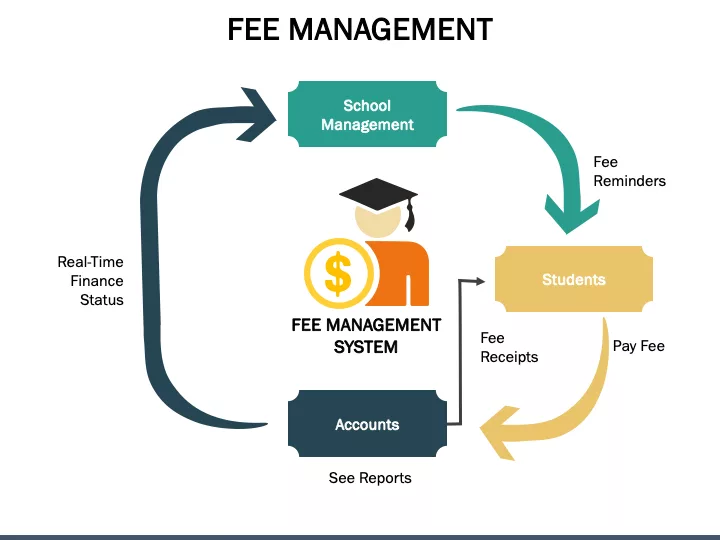
Dealing with school fees and money stuff is a huge deal for all schools. They gotta collect fees on time, keep good records, plan how to spend their money, and keep track of costs. If they handle the fees & finance management right, the whole place runs like a top, and parents feel good about sending their kids there. Lots of schools are switching from doing things by hand to using computers. A cool system like Rejoice Learning makes it way simpler to keep tabs on everything without messing up. In this blog, we’re going to break down fees and money management in plain language and tell you why it matters to every school. What’s Fee & Finance Management? Basically, it’s taking care of all the stuff that has to do with: Getting school fees Giving out receipts Seeing who still owes money Keeping track of what you spend Making budgets Putting together financial reports It helps the school keep all the money stuff clear, organized, and secure. Why Fee & Finance Management Matters? Makes Parents Trust You When the fee info is easy to grasp and right on the money, parents have faith in the school. They can see their payments and receipts without any trouble. Reduce Mistakes Doing things by hand can lead to mistakes. A digital system does all the math without errors. Saves a Lot of Time Teachers and office workers don’t have to mess with big notebooks. The system takes care of everything automatically. Helps with Planning Schools can see how much money they’ve made and how much they’ve spent. This comes in handy when they’re planning what to shell out for things like books, equipment, salaries, and keeping the place up. How Rejoice Learning Can Help Your School Rejoice Learning gives schools an easy-to-use platform to handle all fee and finance tasks in one spot. It cuts down on work, makes things more accurate, and keeps stress low. Here are some cool things it does: Easy Online Payments: Parents can pay dues with UPI, online banking, or cards, so they don’t have to visit the school. Custom Fees: Schools can create different fee plans for different classes, transportation, activities, or programs. Plus, it’s simple to add discounts. Instant Receipts: Parents get their receipts right away after paying. No mix-ups! Automatic Reminders: Parents get reminded about fees that are coming up, what’s still owed, and when payments are due. Expense Tracking: Schools can keep track of where the money goes, which makes it clear. Budget stuff: Schools can plan out budgets for each month or the whole year and put income and spending side by side. Reports: Rejoice Learning makes clear and correct reports that help with audits, checks, or meetings. Safe and Sound: All fee and payment information is kept safe. There’s no worry about losing data. What’s Good About a Digital Finance System: Crystal Clear: Every payment is tracked correctly. No more confusion about what’s settled and what’s outstanding. Fast Payments: Parents can pay up anytime, anywhere. Less Paper: Everything’s online. Say goodbye to stacks of files. Track Overdue Dues Easily: The system shows who owes what. Schools can send reminders with one click. Easy Audits: Auditors get the reports they need, quick and easy. Better Planning: Schools can plan events, buys, and staff payments with good numbers. Saves Time: Staff doesn’t have to count cash or write data in registers. It’s all automatic. Some Quick Tips for School Finances: Give Fee Dates Early: Tell parents about fee plans at the start of the year. Go Digital: Online payments are safer and quicker. Keep Records Current: Enter all payments and spending often. Check Budgets Every Month: Look at income and spending each month so you don’t fall behind. Stay Secure: Go with a platform you can trust, like Rejoice Learning. To Wrap It Up Keeping track of money is key for schools. Clear and organized finances help things run well, keep parents content, and let teachers focus on teaching. Doing things by hand can cause problems, but systems like Rejoice Learning make everything simple, quick, and correct. With Rejoice Learning, schools can handle fees, costs, budgets, and reports all within one system. It makes things open, saves effort, and helps schools succeed. FAQs regarding Fee & Finance Management Ques. Why should schools care about fee management? It keeps things in order, cuts down on errors, saves time, and makes parents happy because everything’s clear and upfront. Ques. How does going digital with fee management help? A digital system means less paperwork, automatic reminders, receipts right away, easy tracking of who owes what, and spot-on financial reports. Ques. Can parents pay fees online with Rejoice Learning? Yep! They can use UPI, debit or credit cards, online banking, or digital wallets. Ques. Is paying online safe? Totally. Rejoice Learning uses secure payment methods and keeps all data super safe.

Fee & Finance Management Read More »

Attendance Management

Attendance Management

Keeping track of who’s here, who’s not, who showed up late, and who left early is what attendance management is all about. It matters a lot in schools, colleges, and at work. Showing up regularly helps you learn, do your job, and stay on track. Now, lots of places are using online systems for attendance because they’re quick, not hard to use, and better than doing it by hand. In this blog post, we’ll break down attendance management so it’s easy to understand and see why it’s so important. What’s Attendance Management? Attendance management is how you keep track of who’s present, whether it’s students or workers. It lets teachers, principals, and HR see: Who’s here today Who’s not here Who showed up late Who left early How long someone worked or studied You can do attendance by calling out names, or by using machines, cards, apps, or online programs. Why It’s a Big Deal—Especially for Online or Mixed Learning For a learning platform like Rejoice Learning—which is all about flexible, digital education—keeping track of who’s there is super important. Here’s the lowdown: On time & focused: If students know attendance is taken, they’re more likely to show up to class on time. No secrets: Parents and students can check attendance records—that makes things fair and builds trust. Plan better: Teachers and school staff can plan classes and online stuff a lot easier when they know who’s been coming. See how they’re doing: Showing up regularly helps see how dedicated a student is and how they’re improving. No guessing games: It can be hard to keep track of who’s at online or mixed classes. An attendance system makes it clear. Features of a Good Attendance Management System A good attendance system should be: Easy to use Fast and automatic Accurate and error-free Able to send reports easily Able to track leaves and holidays Safe and secure Mobile-friendly Benefits for Students, Parents, and Teachers: These features make attendance simple for teachers, staff, students, and employees. For Students Helps you get to class on time, every time. You can see your attendance record easily. Teaches you to be responsible and disciplined. For Parents You can easily see if your child is in class. You’ll know exactly when classes happen, so you can relax. We’ll let you know if your child skips class, making it easy to talk about it. For Teachers & Admins Saves a ton of time since you don’t need paper or spreadsheets. Automatic tracking means fewer mistakes. You can plan classes better using actual attendance data. Helps you spot students who might need extra support because they miss class a lot. Easy Ways to Handle Attendance with Rejoice Learning Running a learning platform or online school? Here’s how to manage attendance without a headache: Go digital – ditch paper! Keep records safe and easy to get to. Require attendance – for all live classes or important stuff. Send attendance reports – to students and parents regularly. Set clear rules – explain what’s present, late, absent, and leave. Make login simple – easy check-in means students won’t struggle with attendance. Back up your data – don’t lose those attendance records! Final Thoughts: Keeping track of who’s present is really important for schools and jobs. It helps keep things in order, plan stuff out, and see how everyone’s doing. Doing attendance by hand is okay, but it can be a pain. Digital systems save time and make fewer mistakes. They’re easy, secure, and super useful. If you want things to run smoothly, keep good records, and have better discipline, a smart attendance system rocks. It makes everything easier and faster for everyone, without the stress. FAQs regarding Attendance Management Q. Why does attendance matter in online classes? Showing up in online learning shows you’re engaged. Teachers can see who’s keeping up and who might be struggling. Q. How does Rejoice Learning keep track of who’s there? Rejoice Learning can use tech to automatically mark you present when you join live classes or log in. Q. Can parents see if their child is attending? For sure. Parents can check their child’s attendance daily, weekly, or monthly. Q. Does attendance matter for grades? Yes. If you attend class regularly, you tend to learn better, turn in work on time, and get better grades.

Attendance Management Read More »

Time-management tips for school principals

Time-management tips for school principals

A huge responsibility comes with the position of the school principal. Each day, you need to care for teachers, students, parents, and school matters. At times, it seems that there is no time left for anything else. This is the reason why acquiring the skill of time management is vital. It not only makes you peaceful but also enhances your performance and the quality of your school’s leadership. Let us discuss in this blog some easy and practical time-management tips for school principals Why Time Planning Matters for Principals Principals do a lot—teaching plans, parent meetings, advising teachers, and looking at reports. If they don’t plan well, things get crazy and stressful. Good time planning helps you: Focus on what’s important. Get things done when you should. Balance work and home. Have a happy and organized school. Here are the time-management tips for school principals: 1. Plan Your Day Start by writing down what you need to do. Choose the three most important things and do those first. This keeps you organized and stops you from panicking later. You can use a notebook, a calendar, or an app like Google Calendar to plan. 2. Share the Load Don’t try to do it all yourself. Your team is there to help. Trust your vice-principal, teachers, and office staff to do their part. Like: Teachers can run student activities. The office staff can deal with paperwork. Department heads can handle lesson planning. Sharing the work not only saves you time but also makes your team feel valued and gives them responsibility. 3. Zero In on What’s Key Some things matter more than others. Put your energy into what really makes a difference for students, supports teachers, and makes the school better. Think of it like this: Things that are important and need to be done now: Do them ASAP. Things that are important but can wait: Schedule them for later. Things that aren’t that important but seem urgent: Pass them off to someone else. Things that aren’t important at all: Skip them if you can. This way, you’re sure to spend your time on what counts. 4. Keep Meetings and Emails Brief Meetings can really eat up your day. Try to finish them in about 30 minutes. Always have a clear goal for the meeting so everyone knows what to expect. Also, don’t be glued to your email all day. Instead, check it a few times a day—maybe in the morning, after lunch, and before you head home. This will help you stay on task. 5. Use Technology to Save Time Tech can really simplify your job. Use school apps and systems to handle stuff like attendance, reports, and talking with people. Here are some useful things: Google Workspace – For meets and planning things out. WhatsApp or Teams – For talking fast. School software – For student info. These things help cut down on things and just speed up work. 6. Make Time for Yourself Being in charge can be a lot! Take a short break to chill. Go for a walk, read, or just breathe deeply. Also, hang out with your family and do fun things. When you are relaxed, you work better. 7. Plan Ahead Don’t just plan for today. Plan for the whole week or month. This helps you remember big things like tests, meets, and school events. At the end of the week, see what went well and what to fix. 8. Don’t do so many things at the same time People think they can do lots of things at once, but that leads to errors. Just focus on one thing, finish it, and then do the next thing. If you get stopped, relax before starting again. This helps you stay focused. Conclusion Time management is not a mere matter of speed—it is a matter of skillful working. For a principal, the time spent on management brings the fruits of better leading, staff supporting, and a happy school community. Planning the day, redistributing work, and concentrating on the real issues can lead you to a stress-free life and to a higher number of daily outputs. FAQs regarding Time-management tips for school principals Ques 1. Why is time management important for principals? Ans. This skill allows them to cope with first-class work, bring down stress, and, consequently, make better decisions for the school. Ques 2. How can principals save time at work? Ans. By putting on their calendars their tasks and deadlines, making use of software, and cutting out the less important things. Ques 3. What tools can principals use to manage time? Ans. They can make use of paper planners, Google Calendar, or school management software. Ques 4. How can principals balance school and personal life? Ans. They can do this by setting boundaries, taking time out, and refraining from doing too much extra work. Ques 5. What’s the first step to good time management? Ans. Start each day with a simple plan and stick to it as closely as possible.

Time-management tips for school principals Read More »

Audit preparation tips for school finance departments

Audit preparation tips for school finance departments

Operating a school is not only about educating children – it’s also about managing money correctly. School undergoes an audit process each year to review whether they are being financially accurate and transparent. Getting ready for an audit can be overwhelming once the situation presents itself, but by taking the proper steps, it can be a very simple and straightforward process. Here are some simple audit preparation tips for school finance departments that can help with organization and handling the audit process. The Importance of Audits for Your School An audit is basically a “check-up” on your school’s finances. It tells you if all of the dollars were used appropriately and if your records are accurate. Audits support schools to: Build trust with parents and donors. Avoid mistakes or fraud. Comply with regulations from the government or education. Better use resources to improve their financial planning. If you have a clean audit, it demonstrates transparency and accountability for your school. Audit preparation tips for school finance departments are as follows: 1. Prepare Early Do not wait until the audit date to start gathering documents. You can start this process months before the audit. Do the simple things early: Review the prior year’s report and address any outstanding issues. Create a timeline of things to get completed prior to the audit. Assign individual staff members to audit responsibilities. When you prepare early, you will save time and not have to deal with the stress of doing it all at once. 2. Maintain Organized Records  Your records are the most critical aspect of an audit. Every payment, fee, or expense should be supported by documentation. It is ideal to keep all records together in locations, preferably digitally. Important records include:  Bank statements Payroll and payroll records Fee receipts and invoices Expense reports Asset records (computers, furniture) Tax documents and grant documents Organized records assist auditors in not only finishing quickly but also contributing to a professionally run program. 3. Reconcile and Match Your Accounts  Before the audit, you should reconcile your accounts with your bank records. If there are discrepancies, address them immediately. To accomplish this:  Each month, reconcile your records with bank statements. Ensure you have recorded any and all receipts or payments. Ensure you have correctly recorded the totals matching. Reconciliation will help to surface discrepancies in your records sooner rather than later, and if there are problems, it will make those surface with minimal impact. 4. Refresh Your Financial Regulations Community schools need to understand explicitly the policies or rules in place for the school finances. Look them over before the audit and refresh them where warranted. The policies should include how you handle: Vendor payments Petty cash Fee refunds Budget approvals Purchases and expenses When everyone is working off the same financial rules, the school’s finances should be clear and simple to manage. 5. Conduct a Small Internal Audit Audited Before Before the audit review process takes place, do a quick “dry run” audit within the school. This process helps to correct small irregularities in advance. Check for things like: Missing papers or bills Wrong entries in the accounts Not reviewing checks that have been issued Not following the school’s policies or any other area of non-compliance Make the corrections to all of these before the audit takes place. Doing this will demonstrate to the auditors that the school is responsible and prepared. 6. Reach out to the Auditors in advance Good communication makes the audit process easier. Reach out to your auditor before the audit begins. Ask the auditor: The date and timing The specifics of what documents go where Is there anything specific they are looking for When your team and the auditor are in alignment, it will naturally go more smoothly and efficiently. 7. Train Staff Your finance team needs to know how to capture records without breaking the rules. Provide them basic training on accounting principles, proper usage of software, and the audit process. With educated staff, they will be able to: Enter data in an acceptable format Provide the reports the auditor is requesting, without a problem Be confident instead of nervous when asked about data by the auditor When your team understands the process and the basics of the audit, things will easily flow. Final Thoughts Planning for a school audit doesn’t need to be overwhelming. With the right planning, good records, and a trained finance team, you can confidently manage any audit. At Rejoice Learning, we assist schools in smoothing out financial management, thereby enhancing accountability. A well-prepared audit will meet not only your compliance needs but also show your school’s commitment to transparency and excellence. FAQs regarding Audit preparation tips for school finance departments Ques1. Why are financial audits of schools needed? Ans. Audits ensure that money in a school is utilized appropriately and that records are accurate and follow all regulations. Ques2. How easily can schools prepare for an audit? Ans. Records should be kept clean, accounts reconciled monthly, and internal audits conducted. Ques3. What is an internal audit? Ans. It is a small audit done by the school itself to find and fix issues before the main audit. Ques4. Can digital tools help with audit preparation?  Ans. Online document systems and accounting software do make audits faster and more accurate. Ques5. Why should schools choose Rejoice Learning?  Ans. Rejoice Learning helps schools to manage better, simplify their systems, and secure full compliance with educational and financial standards.

Audit preparation tips for school finance departments Read More »

Why traditional school management systems fail in 2025

Why Traditional School Management Systems Fail in 2025

As we enter 2025, the learning environment in schools is very different. Teachers, parents, and students rely on technology for almost all aspects of school — from online classes to report cards. However, many of the schools still operate on outdated management systems or on paper. While these old systems served their purpose in the past, they are not equipped for this new way of school. It’s time to talk about why traditional school management systems fail in 2025. Reasons: Why traditional school management systems fail in 2025 1. Old Technologies Cannot Keep Up with New Productivity Requirements  Old school systems were created many years ago. Although these systems could track attendance, record marks, or add fees, and that is they could do that. Today, schools need to manage: Online classes • Offline classes Homework & Exams • Parent communications Fees & Payments • Student performance reports Prior systems cannot provide helpful services like cloud storage, mobile apps, or instant notifications. In the end, the systems become bogged down and contribute to making work harder for everyone. 2. Too Much Paperwork  Many schools still perform activities as before. Teachers write out attendance, draft report cards, or send out messages, all on paper. Not only is this very agitating, but it takes a significant amount of time and tends to lead to errors. Modern systems can accomplish these tasks automatically with a click of a button. They take attendance, produce report cards, and send messages in seconds. Old systems steal valuable time and energy from an easily overworked faculty and staff, which, before, may have been a frivolous consequence of time spent in 2006, but is not possible in 2025. 3. Slow Communication In today’s world, everybody wants fast updates. Parents want to keep up with their child’s learning, students require quick access to their homework and assignments, and teachers need an easy way to send and share information. Traditional systems will not provide that. Schools still rely on paper notices, emails, and phone calls for communications, all of which take too long. Modern systems incorporate apps and dashboards that can send alerts instantly about attendance, marks, fees, and school events, which keep parents and students informed and connected at all times. 4. Inadequate Data Security Schools are keeping a lot of sensitive information, including personal information about the student, their marks, fees, and reports. Older systems saved student information on local computers and sometimes even in files. This is increasingly lower security for data because: Computers fail or crash, and your data could be lost. Data can be deleted accidentally or maliciously hacked. Paper files can be lost or ruined. Modern cloud-based systems can effectively manage that better than any old-school system. All information can be kept logged in securely in any way you need it saved within a cloud application. Even if something goes wrong, schools have a better chance of recovering the data from cloud systems than from local device storage. In 2025, data security is absolutely critical, and older systems provide no security. 5. Parents and Students Feel Frustrated  Parents today expect schools to be digital. They are no longer satisfied with having to write a check to pay for fees, check report cards on paper, or not get regular updates about their child. In traditional systems, parents have to go to the school to do all of this. It is time-consuming and inconvenient. The benefit of modern systems is that everything can be done with a few clicks. When parents and students receive easy updates, they feel more connected to the school. 6. No Reports or Insights New systems not only store data, but they can also analyze the data. They can show which students are successful, which students need help, and what teachers can do to improve lessons. Old systems are passive: they store data, but they provide no insights. In 2025, school systems seek smart reports that aid development and facilitate improvement of educational quality. Otherwise, traditional systems represent data storage without much value. 7. Will Cost More Over Time While some old systems may seem cheap at first, they end up costing more over time. Schools have to spend money on: Repairs Upgrades Data recovery Additional staff to perform manual work Modern cloud-based systems do not require additional machines or upgrades. They are faster, safer, and ultimately cheaper. The Smart Way Forward: Throughout the world, progress will be made towards technology, and schools will have to make that move as well. Traditional systems have become slow, unsafe, and outdated; they make work harder instead of easier. New school management systems are easy to use, engaging, cloud-based, and safe. They assist schools with attendance, fees, online classrooms, exams, and reports — all from the same place. These systems save teachers time and facilitate communication with parents. They can make the work of educating smarter, safer, and easier for all involved. Conclusion Conventional school management systems failed in 2025 because they are relics of former times. Schools need modern tools that are fast, safe, and user-friendly. Schools benefit from not being bogged down as they transition to smarter systems; they will save time, release stress, and enhance communication. It is time to farewell these antiquated systems and transition to a larger, brighter, and smarter future in education. FAQs Regarding Why Traditional School Management Systems Fail in 2025 Ques. Are cloud-based systems safe for schools? Ans. Yes. Cloud-based systems are incredibly safe. They use passwords, encryption, and backups to protect school information. Even if a computer breaks down, the data is still stored and safe online. Ques. Is it expensive to switch to a new system? Ans. Not really. Most new systems today are available with a reasonable monthly fee or yearly fee. They usually save money over time because they eliminate the need for additional staff, paper, and maintenance. Ques. How can a school move from a traditional to a modern system? Ans. Schools can upgrade quickly by selecting a well-known, trusted digital platform.

Why Traditional School Management Systems Fail in 2025 Read More »

Common challenges faced by school administrators today

Common Challenges Faced by School Administrators Today

Running a school is a challenging task. School administrators face many obligations — from maintaining relationships with teachers and students to keeping parents satisfied and managing the school budget. Nowadays, with so much rapid change, administrators face many new issues arising every single day. Let’s take a look at some common challenges faced by school administrators today and what they can do better to deal with these concerns. The Common challenges faced by school administrators today as follows: Here is the list of Common challenges faced by school administrators today: 1. Lack of Teachers and Staff: The primary challenge many schools face is teacher shortages. Teachers are leaving the profession due to work stress, workload, or pay. When a teacher leaves or resigns, the school and the administrator will either have to manage without a teacher to provide instruction or rely on hiring a teacher to fill the vacancy. School administrators can work to create a more supportive atmosphere, adequately acknowledging teachers’ contributions, and implementing teacher professional development opportunities. Teachers are much more likely to remain in their position if they feel appreciated and supported. 2. Budget and Financial Issues At every school, there seems to be a scarcity of money. Administrators have to determine how to appropriately use their finances to best serve the school’s needs (books, classrooms, maintenance, technology, and salary). Sometimes there are simply not enough funds to meet all of the school’s needs, and, when that occurs, administrators can look for additional available funding from government grants, donations, or support from the community. Smart transparent disclosures can be transformational through safe structures as well. 3. Technology and Digital Learning Technology plays a major role in education. Many schools now utilize computers, smart boards, and online platforms to educate students. Not all educators and educational settings, however, are comfortable utilizing technology or have the same access to digital resources. Superintendents and other school administrators must ensure that educators are provided adequate training to utilize digital tools and that students have safe and easy access. They must also ensure that district and school data are protected from hackers and online dangers. With a thoughtful approach to technology, learning can be more entertaining and successful. 4. Mental Health of Students Students today face substantial pressure associated with their schoolwork, exams, and personal lives. Many students either have mental health issues, such as anxiety or depression, or feel pressure to perform, which can lead to additional struggles. Administrators must ensure schools are safe and caring places for all students. Ways to ensure mental health support are available include hiring counselors, arranging for mental health workshops, and creating a culture of open dialogue among students, teachers, and parents. Initiatives, such as kindness campaigns or stress management sessions, take little effort and can make a substantial impact. 5. Parents’ Expectations.  Parents have the best intentions for their children, which is greatly appreciated, but can sometimes lead to expectations that are too demanding or extreme. While administrators and educators address the complaints, they find themselves the subject of parental complaints or pressure for special treatment or quicker results. As a remedy to this, schools should emphasize communication. Regular meetings, newsletters, or parent-teacher conferences create shared information among the school and parents.  These acts keep the parents informed and knowledgeable about the course of the school. When parents know how things are done in the school, it becomes easier to partner with them for the child’s education. 6. School Safety and Discipline Student safety is always paramount. As administrators, we have to address situations such as bullying, fighting, or unsafe situations. Every school needs policies on bullying and violence. Introducing some sort of awareness program, along with safety drills along staff training, creates a safe and secure environment. Students should feel comfortable reporting a problem without threat of reprisal. 7. Adhering to Academic Standards  Each school must abide by some regulations and academic standards, dictated by the education board. It falls to administrators to ensure the school continues to meet these standards, while also allowing for enjoyment in learning. In other words, there is a balance between excellence in academics and creative engagement. Administrators help teachers create this balance by providing them the support in the form of materials, workshops, and encouragement to try new ideas in their classes. Teachers who feel supported positively impact student learning. 8. Communication and Leadership A school benefits immensely from good communication and good leadership. School administrators must interact regularly with teachers, students, parents, and occasionally with government officials. Miscommunication can result in doubt and anxiety. Strong leaders are not limited, but rather understanding, patient, and fair. If an administrator listens and takes into account the opinions of all, then the climate of the school is elevated to a more positive experience for everyone. To Conclude: The role of school administrators is very important in shaping education for the future. Their responsibility is more than the paperwork aspect — it is fundamentally about leadership, managing people, navigating solutions to problems, and fostering a positive environment for learning. They can run into challenges — whether related to staffing, finances, or mental health — their leadership can be the turning point for their success. By working together, having strategic leadership, and supporting both teachers and students, administrators can work through sometimes very difficult problems to strengthen their school environment. If you’re looking for a modern, all-in-one solution, we invite you to take a look at Rejoice Learning. Please set up a demo with us today.  Let us support your school for the next era of learning. FAQs regarding Common Challenges Faced by School Administrators Today Q. What are the biggest issues in recruiting and retaining great teachers? Ans. Teachers have too many things to do or too few means of being supported. Schools that are innovative and modernize workflow can help teachers have a positive experience where they have work that makes them happy to come into work. Q. How do school administrators cope with budget limitations? Ans. They need

Common Challenges Faced by School Administrators Today Read More »

How to Build an Efficient School Workflow: Insights for Rejoice Learning

How to Build an Efficient School Workflow: Insights for Rejoice Learning

In the modern education ecosystem today, creating an efficient school workflow is not only optional, but it is foundational. For an organisation which is committed to delivering integrated learning solutions for schools, teachers, and parents alike, it is important to have a streamlined workflow. It offers a central to its value proposition. Running a school or an educational institution is more than just classrooms and curriculums. It is about managing hundreds of moving parts properly. Schools have to face numerous processes daily from admissions and attendance to lesson planning.  This is where Rejoice Learning comes in. Offering a cloud-based education management software, Rejoice Learning is committed to offering tailored-made digital solutions that can help improve collaboration and empowers the educators to focus on the actual thing, delivery quality education.  Do you want to know how to build an efficient school workflow? This blog is for you. In this blog, you will get to know about how to build an efficient school workflow which is tailored to school context but applicable. Let’s start our blog and get to know how to build an efficient workflow in a school. 1. Start with Clear, Centralized Processes The primary foundation of an efficient workflow of the school is clarity and structure. If your staff, teachers, and administrators are aware of how each process works, everything runs more smoothly. Rejoice Learning can be helpful in: Integrating all operations, such as admission, attendance, communication, and academics in a single dashboard.  Everyone has the real-time updates, including fee payments, class schedules, and student progress reports.  Administrators, teachers, students, and parents get customized dashboards that are well suited to their responsibilities.  2. Automate Routine Tasks to Save Time With automating the day-to-day operations, schools can eliminate errors, reduce paperwork, and give staff more time to focus on engaging students and teaching. Rejoice Learning offer automation features that are built exactly for: Attendance tracking including recording and updating attendance automatically and remove the need for paper registers.  Automated reminders and digital receipts that can simplify the fee management.  Examination scheduling such as tests, manage grades, and generate report cards in just a few clicks.  3. Strengthen Communication and Collaboration Strong communication and collaboration are the primary features of efficient schools. When teachers, parents, and management communicate with each other effortlessly, decisions become data driven.  Rejoice Learning can be helpful in strengthening communication at every step as: Parents can track attendance, announcements, and performance in real time. Teachers and admins can exchange messages or notes instantly that can lead to reduce delays and miscommunication.  Automatic alert for events, deadlines, and circulars that can keep everyone informed.  4. Integrate Data for Smarter Decision-Making Data is the new backbone of efficiency when talking about modern education. Schools generate significant amounts of data daily, including grades, attendance logs, and fee records. If data is not organized, it cannot support the smart decision. For better decisions, the data should be organized and accessible.  Rejoice Learning’s cloud-based infrastructure ensures: Real time data insights. Analytics Dashboard Informed Decisions 5. Train and Empower Your Staff If your teaching is not confident, even the best system won’t help. Your staff should be trained, you need to empower your educators and administrators so that they can know how to use their tools effectively.  Rejoice Learning supports schools with: Creating a user-friendly interface which is designed for easy adoption, even for those who have no much knowledge about technology. Comprehensive training with guided onboarding sessions that ensure everyone from teachers to staff can make the most of the system.  Rejoice Learning is committed to providing support that helps institutions every step of the way.  If your team knows how to use the software, the workflow will be smoother, faster, and more consistent.  6. Build a Culture of Continuous Improvement An efficient school workflow can be refined over time. Schools that embrace continuous improvement can become more adaptable and resilient. How is it possible? It is the answer: You need to encourage the teachers and administrators to share workflow challenges and suggestions. Track turnaround times, student outcomes, and process efficiency regularly.  Use analytics of Rejoice Learning to identify the bottlenecks and adjust processes.  7. Ensure Scalability and Security Workflow can become complex and fragmented with the growth of the school. Scalability and security are the most important parts of an efficient school system. With the cloud based architecture of Rejoice Learning, you can ensure that with the growth of your institution, the system scales seamlessly.  Manage multiple branches and institutions from one central platform. End-to-end encryption and secure cloud storage that protect sensitive information.  Teachers and administrators have remote accessibility so that they can access data securely from anywhere and ensure flexibility and control. 8. Keep Students at the Center of Every Workflow Enhancing the student learning experiences is the most important thing as every process whether administrative or academic should serve one purpose. The philosophy designed by Rejoice Learning is built around the idea of keeping students at the center of every workflow. By reducing administrative load, automating tasks, and improving communication, teachers and management can focus more on the student engagement and learning outcomes.  Conclusion Creating efficiency within a school workflow isn’t about layering more tools on top of an already segmented system, rather it’s about finding harmony between people, processes, and technology. Rejoice Learning gives schools more than just a management system, it becomes a partner in streamlining operations, simplifying communication, making logistics more efficient, automating builtin workflows, and improving the learning experience. By adhering to the steps described above, from centralizing processes to automating processes, engaging staff, and emphasizing continuous improvement, educational organizations are able to tap into the fullest potential of their people and technology. At Rejoice Learning, we believe that technology has the potential to change education. When workflows are efficient, education is more impactful, purposeful and ready for the future. Contact Rejoice Learning Today! Call Us at: +91 90410 47498 Mail At: info@rejoicelearning.in Frequently Asked Questions: Building an Efficient School Workflow Can technology

How to Build an Efficient School Workflow: Insights for Rejoice Learning Read More »

How to Select the Right Digital Tools for Your School

How to Select the Right Digital Tools for Your School

Schools, nowadays, have the widest range of digital tools available to them. However, this plethora of choices results in a lot of confusion as well. The decision on which tools to use is less about the latest trend and more about picking the one that will genuinely help the whole school in the areas of teaching, learning and its specific requirements. Here is a straightforward and simple guide to assist you in selecting the right tools for your School. 1. Start with your school’s goals Before diving into specifics to characterize tools, one has to pose an evaluatory question: What are the ultimate goals? Increase student engagement? Enable personalized learning so that students can learn at their own pace? Make it easier for teachers by cutting down on administrative tasks? When you define your main objectives, you can evaluate the tools in comparison to those objectives instead of just being attracted to the “cool features” alone. 2. Involve the right people The selection of digital tools is a collaborative process among team members. The educators can tell what is effective in their classrooms, the learners can say what their preferred ways of learning are and the IT specialists can tell what is possible in the existing infrastructure. One survey reveals that more than 80% of the teachers regarded their co-workers as the most trustworthy source in the process of choosing digital tools. Hence, do not hesitate to involve all these users in the decision-making process—this will definitely make the tool more accepted and less likely to be neglected. 3. Use a thoughtful evaluation framework It is a good idea to use a checklist or any systematic approach to make a comparison with regard to the options. What is more, these are the major points of consideration: Is the tool a necessity for a particular teaching/learning scenario or just a luxury? Is the data security along with student-privileges taken care of? Most of the time, digital tools do collect student data, therefore, you would require a secure platform. What is the level of school infrastructure (internet connection quality, devices available, and technical-support)? A powerful tool will fail to show its benefits if the infrastructure does not support it 4. Pilot the tool before full roll‐out Try the tool first on a smaller scale instead of directly buying it for all classes or all grades. For instance, you may select a teacher or a class and provide them with a trial, collect their feedback, watch the interactions between the students and the teachers, and determine whether it is bringing the expected results or not. One guidance suggests regarding the first implementation as a pilot, thus you can modify the plan instead of fully committing without understanding what works.  This way, you can perfect the training, make changes in the workflows, and fix the integration problems, all prior to the complete rollout. 5. Make sure training & support are in place The superb tool cannot be utilized in the absence of teacher’s comfort or the failure of the support that is provided. Ask questions like: What is the training provided? Is there going to be the lasting professional development? Can I get help when I have problems? Will the vendor be responsible for the updates and maintenance?  Question: For instance, can we afford its cost in the foreseeable future? Is it really fitting that a tool can get flexible because it can get reprogrammed as the school grows or changes? The above questions help in verifying that the tool will be useful rather than just a one-time experiment. 6. Keep student-learning and teacher-workflow at the center If tools are chosen merely for their “digital trendiness,” they are usually left as toys and not as real aids. Instead, it is better to ask continually: In what way does this tool deliver better learning for students? Does it support teacher practice (instead of making it more difficult)? For instance, does it allow teachers to have clear dashboards to track progress? Does it enable students to work at different speeds? Does it foster collaboration? One article points out that digital tools should offer real-time feedback and also provide support for the varied needs of students as a matter of course. Moreover, the user interface must be functional – particularly for children who require tools with easy navigation. In Conclusion It is not just a matter of selecting the newest platform or checking off the use of technology when choosing the appropriate digital tools for your school. The selection must be in harmony with the school’s objectives, the right people must be involved, the options must be evaluated thoroughly, and the whole community must be supported with training, feedback, and review during the process of scaling up after piloting. Improving teaching and learning is the main reason behind this strategy—teachers’ time will be freed up for the most important activities, individualized support will be given to students, and the digital environment will be in line with the school’s values and context. By partnering with Rejoice Learning, you are not only choosing a tool that will help with the personal learning, teacher workflows and overall school system but also making your digital-tool choice really impactful. FAQs Why do schools need digital tools? If the schools use digital tools, then they make learning more engaging, help many teachers save time and give students a more personalized learning experience. How can we know if a digital tool is right for our school? First of all, check if they match your school goals. It is easy to use and safe for students. One more thing, check if they fit in your budget system or not. Should teachers be involved in choosing the tools? Yeah, for sure, teachers can use the tools daily because their feedback is also very important.z What’s the best way to test a new tool? The best way to test this tool is to run a short like, head with a few classes before using it across

How to Select the Right Digital Tools for Your School Read More »

The Difference Between ERP, LMS, and School Management Systems

The Difference Between ERP, LMS, and School Management Systems

Schools are undergoing very swift changes in the digital era of today. All activities such as managing classes, taking attendance, and communicating with parents, fee collections, and learning needs facilitation have to be organized in a perfect manner. Digital systems such as ERP, LMS, and School Management Systems are the only solutions to such problems. Although these three expressions are sometimes considered synonymous, they actually correspond to different functionalities. Let’s clarify the roles of each and how they contribute to making the schools operate in a more intelligent way. What Is an ERP in Education? ERP (Enterprise Resource Planning) is a software that allows educational institutions to manage all their administration and operational functions through a single platform. It serves as the underlying system preventing the disruption of the school’s non-academic sector operations in a seamless manner. What an ERP usually handles: Student admissions and enrollment Fee collection, accounting, and budgeting HR management for teachers and staff Attendance and payroll Transportation, library, and inventory management Reporting and analytics for school leaders In short, ERP deals with the business and management aspects of education. It takes away manual work and time-consuming activities; besides, all the administrative data remains connected. For instance, once a student fee is cleared, the finance and student records automatically get updated with the same data without any manual entry of it twice. What Is an LMS? An LMS is a system that centers around education and training exclusively. It serves as the “virtual classroom” where all interactions related to content, assessments, and learner monitoring take place. Main characteristics of an LMS: Giving a subject or course, lyrical materials (videos, documents) Assignments and quizzes Monitoring student progress and performance Mediation of communication between teachers and students Backing up online and blended learning Due to LMS being very learning-centric, one article points out that the primary sphere of the LMS is content delivery and learner interaction whereas the sphere of the ERP is mainly that of managing the various business processes. What Is a School Management System? An SMS or School Management System consolidates all the educational and administrative processes on a common platform. It is tailored more to schools than a standard ERP package, and usually, combines the functionalities of both ERP as well as LMS. Functions of a School Management System: Students’ records and profiles Attendance and timetable management Exams generation and report cards Fees collection and notifications Parent communication and announcements Library, transport, and hostel management (if applicable) ERP vs. LMS vs. School Management System Here’s a simple comparison to understand the differences clearly: Feature ERP LMS School Management System Main Focus Administration & operations Teaching & learning Overall school functioning Main Users Management & admin staff Teachers & student Everyone – admin, teachers, students, parents Purpose Streamline school operations Deliver and track learning Combine both academic and administrative needs Examples of Use Fee collection, payroll, reports Get classes online with quizzes and assignments Provide attendance, communication, and exam results Why We Know the Differences Different schools have different requirements. Some schools require assistance in minimizing paperwork as well as data management, while others are looking for better online learning tools or parent participation solutions. Schools, however, must be aware of the ERP, LMS, and School Management Systems features before making a choice that is not only wise but also one that will serve their unique needs.  Let’s take a look at the importance of these systems: A major gain in efficiency Digital systems can help schools automate tasks such as the keeping of attendance records, tracking of payment of fees, and reporting. All the processes done automatically consume less time and there are no manual errors involved. More effective decision-making The school administrators can gain access to the real-time insights required for making better decisions when all the school data is kept in one system. Better learning experience LMS will not only enhance the interaction among teachers and students but also make the classes more accessible. For instance, students can set their own learning speed while the tutors are aware of those who need more help. Better Communication   Through the use of electronic resources, parents are capable of monitoring the whereabouts of their children, their academic performance, and participation in school activities, and at the same time, they will not be a constant reminder. Future Readiness Those schools which implement the digital system now will be well positioned to manage hybrid and AI-driven teaching and learning in the future. How They Work Together Although ERP, LMS, and School Management Systems can perform their functions independently, their benefits are maximized when they work together in an integrated environment. To give an example: The ERP keeps student info and updates the records right away. The LMS applies that data to provide every student with access to the appropriate courses. The School Management System interlinks all, associating teaching with management. Due to this integration, there will be no double data entries, considerably reduced mistakes, and a more pleasant workflow for instructors, learners, and office staff. Choosing the Right Solution If your educational institution is considering the digital transition, then you should definitely take the points below into consideration before selecting a system:  Recognize your main requirement — Improved education delivery, smooth management, or both?  Seek out software that is intuitive to use, especially in the case of teachers and students, who will be new to it.  Examine if access is possible for parents and students over mobile today. It should guarantee data protection and provide trustworthy technical support.  Opt for a flexible solution that adapts to the growth of your school.  The right system can completely revolutionize your school’s operating methods and student learning — turning every process into an efficient and meaningful one. Conclusion ERP, LMS, and School Management Systems are three indispensable tools that modern education cannot do without. While ERP is mainly concerned with the administration of the school, LMS takes care of the teaching and learning side of things, and the School Management

The Difference Between ERP, LMS, and School Management Systems Read More »

How to Keep Staff Performance Organized

How to Keep Staff Performance Organized

Operating an enterprise in the fast-paced surroundings we find ourselves may be challenging. If you are seeking to stay on top of a fast-paced business environment these days, you need a group whose performance is not simply high, but organized, seen, and intently aligned with organization targets. At Rejoice Learning with the commitment we have to provide the smart learning platforms and educational tools, the same principle applies internally, when managing staff performance with clarity, shows improvements and flatten the gap for increased happiness of your teams while driving productive growth.  Some ways to keep staff performance organized. Rejoice Learning has brought you a comprehensive guide with clear take aways to implement. 1. Start with Clear Expectations and Goals Before you are going to track any performance, it is important to have measurable expectations. At Rejoice Learning, we work by setting SMART goals. SMART stands for Specific, Measurable, Achievable, Relevant, Time-bound. You need to define individual KPIs linked to the objectives of your business. Communicate how each team member contributes to the mission of delivering education-technology solutions.  Document expectations so that there will be no guesswork. Why is it important? Why does this help? The answer is that when expectations are clear, the performance becomes something that you can track and organize instead of just reacting to. With this practice, you can set the foundation of organized performance management. 2. Use the Right Tools to Monitor and Measure Performance  With Rejoice Learning, you could leverage internal dashboards, project-monitoring gear, or the kind of educator app systems to track tasks, outcomes, attendance, and activities. Now the query arises that what is the need of these equipment to monitor performance? Let us give an explanation for the solution. A centralised performance tracking tool permits you to organise personnel output, discover styles, and decrease guide litter.  With structured information, you can have goal measurement as opposed to simply emotions. It helps you with everyday critiques, trending, and contrast throughout the crew participants or intervals.  It is important to select or construct the right platform and embed it into your ordinary workflow. 3. Schedule Regular Check-Ins The next step you can comply with is scheduling regular check-ins and comments loops. Organized performance is ready ongoing communique. For everyday test-ins and remarks loops, you may: Schedule monthly or quarterly one-on-one take a look at-ins with workforce contributors to study the development in opposition to dreams. In each meeting, you could discuss roadblocks, align on next steps and replace desires if there is any need.  When you’re scheduling test-ins, a team of workers ought to sense cushty sharing what is operating, what is not, and what are the resources required for them. With this regular rhythm, you can keep the performance live and organised rather than buried until the year-end. At Rejoice Learning, you will be given the dynamic nature of ed-tech and learning services. It is important to remember that being agile with these feedback loops is necessarily important.  4. Create Transparent Performance Dashboards and Reports To create transparency in your business, you can: Build a dashboard that summarises key performance indicators, including module completion, support response time, and client satisfaction scores.  Make sure that the staff can see their own metrics and where they stand relative to goals or team average.  Use visual reports, such as charts or heatmaps.  When everyone sees the same performance picture, it can minimise the surprises, fosters accountability and helps teams self-organise around improvement.  5. Link Performance to Learning, Growth and Recognition At an organisation centred on learning, like Rejoice learning, performance organization must be tied to development.  You need to identify the skill gaps from performance metrics and create targeted development plans. You need to recognize high performing staff for career progression and spot bonuses.   Encourage staff to share what’s working for them with their peers. 6. Ongoing Review and Refinement of the System All performance-accountability systems, even the best systems, require ongoing review and refinement. You can conduct a review every 6-12 months where you can ensure that your KPIs are relevant in relation to company goals.  Ask your staff for feedback on the process such as is this helping them in improving their performance in job? Ask them if there is any need to change anything? Adjust tools/processes to stay in line with organizational change. By doing these things, you keep the performance-accountability system dynamic, effective, and connected to the mission of the company to deliver engaging learning solutions. Final Words  Managing staff performance is not only about paperwork, it is about clarity, mutual conversations with staff, and ongoing growth. Rejoice Learning thrives on innovation in the learning space,a well-structured performance management system that can be beneficial for your business. By: setting clear expectations, utilising tools appropriately, establishing a regular feedback cycle, facilitating visibility of performance data, connecting it to learning and recognition, and iteratively improving the system over time,  you’ll develop a disparate team of high performers who will become aligned, engaged, and able to weather anything the ed-tech space throws at them. Consider this playbook with functional advice as one to keep your staff performance organised with Rejoice Learning, so your team can learn, grow, and achieve success together. Frequently Asked Questions About Keeping Staff Performance Organized: Q.1: How frequently do you suggest performance check-ins occur?  It’s recommended to have formal one-on-one check-ins quarterly, and then informal mini-check-ins monthly in some form. This consistency provides structure to the performance process in an orderly manner.  Q.2: Should performance data be placed on display for cross-team transparency?  Team transparency creates accountability & collaboration. Use team level dashboards with individual metrics that maintain anonymity to keep everyone in the loop.  Q.3: Can preferences of performance organization stifle preferred flexibilities?  Not if designed appropriately. Performance organization is clarity of format and clarity regarding flexibilities involved. If you are a Rejoice Learning tech company, you should be able to adjust the goals your employees work on when the market or product demands change.  Q.4: What role does training

How to Keep Staff Performance Organized Read More »

Embracing E-Learning: Why Digital Education is the New Normal

The education landscape has transformed dramatically in recent years, with digital learning emerging as the new normal. What began as a necessity during the pandemic has now evolved into a preferred method of teaching and learning across the globe. Learning Without Boundaries Digital education platforms have made learning accessible anytime, anywhere. Students can attend classes, complete assignments, and interact with teachers from the comfort of their homes. This flexibility has made education more inclusive, reaching learners beyond geographical and physical limitations. Enhanced Collaboration and Engagement Online platforms foster interactive learning through live sessions, digital discussions, and collaborative projects. Teachers can share resources instantly, and students can engage with peers more effectively. This environment encourages creativity, teamwork, and continuous engagement — essential skills for today’s learners. Smarter Tools for Smarter Learning E-learning tools use analytics, AI, and automation to personalize learning experiences. Students receive real-time feedback, while educators gain insights into progress and performance. This data-driven approach ensures that teaching strategies are more effective and tailored to each learner’s needs. A Sustainable Future for Education Digital education reduces the dependency on physical materials, minimizes travel, and promotes eco-friendly learning practices. Moreover, schools using platforms like Rejoice Learning can integrate administration, communication, and academics under one intelligent system — creating smarter, more efficient institutions. Conclusion The shift toward e-learning is more than a trend — it’s a revolution in how we teach and learn. By embracing digital platforms, schools and educators are building a future where education is flexible, engaging, and truly accessible to all.

Embracing E-Learning: Why Digital Education is the New Normal Read More »

5 Ways School Management Software Improves Learning Efficiency

In today’s fast-paced digital era, schools are embracing technology to create smarter, more efficient learning environments. A School ERP system is one of the most powerful tools driving this change, helping educators streamline tasks, save time, and enhance academic outcomes. Here are five key ways it improves learning efficiency. 1. Simplified Administration A School Management Software automates repetitive administrative tasks such as attendance, timetables, and report generation. This reduces paperwork and allows teachers and staff to focus more on student development instead of manual processes. 2. Better Communication Effective communication is essential for learning success. Digital education tools enable instant updates between teachers, students, and parents — improving transparency and ensuring everyone stays informed. 3. Real-Time Performance Tracking With built-in analytics, educators can monitor student progress and identify areas for improvement early. This helps in providing personalized attention and timely feedback, leading to better learning outcomes. 4. Efficient Resource Management From library records to classroom scheduling, the software manages all resources efficiently. Schools can optimize time, reduce confusion, and create a more organized learning ecosystem. 5. Enhanced Student Engagement Digital platforms make learning interactive and accessible. Features like online assessments, assignments, and communication channels keep students actively engaged, fostering a more collaborative and dynamic educational experience. Conclusion Implementing a school ERP system is more than an upgrade — it’s a step toward transforming education. With smarter tools and streamlined operations, schools can focus on what truly matters: empowering students to learn, grow, and excel.

5 Ways School Management Software Improves Learning Efficiency Read More »

The Future of Digital Learning: How Technology is Transforming Education

Education has evolved dramatically in the past decade, and technology has been at the heart of this transformation. The traditional classroom is no longer limited to blackboards and textbooks — it’s now a dynamic digital space where students can learn, collaborate, and grow through technology-driven experiences. This new era of digital learning is shaping smarter schools, more efficient teachers, and highly engaged students. The Rise of Digital Learning The journey toward digital learning began with the introduction of computers and the internet in classrooms. However, the real transformation started when schools began integrating cloud-based management systems, AI tools, and e-learning platforms into their daily operations. These technologies are making education more interactive, accessible, and personalized. With platforms like Rejoice Learning, schools can automate administrative tasks, monitor student progress in real time, and communicate seamlessly with parents. This allows educators to focus less on paperwork and more on nurturing young minds. How Technology is Transforming Learning

The Future of Digital Learning: How Technology is Transforming Education Read More »